I am very happy to announce the release of FileSeek 1.9.4! This release is mostly a bug-fix release, and contains a number of important fixes. The biggest change is the ability to select multiple results items and use the Windows Context Menu, as long as they are in the same folder. Line numbers are no longer shown when using an IFilter search, as the line numbers returned by the IFilter handlers are unfortunately never correct. The last bug-fix allows OpenOffice documents to be properly searched using an IFilter search. For some reason OpenOffice doesn't correctly register it's IFilter components correctly, so a work-around was necessary.
I would also like to let everyone know that you can get settings for the "Open with Other Application" context menu option from here:
http://www.fileseek.ca/ApplicationSettings/
These settings allow you to open a search result item to a specific line number, once the "Open with Other Application" item is configured. This is very helpful for anyone working with source code files, or any other document type where being able to quickly open a document to a specific location is important.
I would encourage everyone to update to the latest version of FileSeek today. Thanks everyone!
After only 2 short weeks after the FileSeek 1.9.2 release I have decided to release a new version with a few minor changes. I received quite a bit of feedback regarding the changes to the file/folder name matching. In version 1.9.2 I added the ability to toggle file/folder name matches by query text or the "include files" filter. This added some long-needed and much requested flexibility, but it also added some complexity. I decided to put those options in the Settings window, not realizing how often people would need to toggle it. After some thought I have moved these options onto the main search window in the form of a dropdown list with 4 different options. This should make it easier for everyone to toggle these settings for each search, without adding too much interface clutter on the main window. I'd like to send out a big thanks to everyone who send me feedback and helped to design this new version. Thanks everyone!

I am very happy to announce the release of FileSeek 1.9.2! This release fixes a few long-standing issues, and adds some expanded search options. You can now treat your search query as a complete string (like all previous versions) or you can treat the query as words and find files that match any or all words. This new ability adds some much needed flexibility when searching files for multiple text strings. Another new addition is the "Search" tab in the Settings window. This adds a handful of new settings for configuring what will appear in the search results. For example, you can have filename matches appear that match the text query or the "include files" filter, or both. Previously, both matches were shown for filenames with no way to configure this. Here are a few more changes in this release:
You can see the complete history of changes in the FileSeek Change Log. Thank you to everyone who submitted bug reports and helped to test this new release. Thanks everyone!

I am very happy to announce the release of FileSeek 1.9.1! This new release fixes a few performance issues, as well as adding some new search features. The long-awaited multiple folder searching is now here, and an option to hide file/folder access errors is also now available. Here are the changes in this release:
You can see the complete history of changes in the FileSeek Change Log. Thank you to everyone who submitted feature requests, and helped with testing!
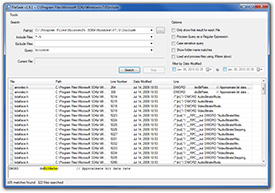
I am very happy to announce the release of FileSeek 1.8.3! This new release adds the ability to filter search results by the Last Modified Date, as well as including a number of important bug fixes. One other important change is the default action when double-clicking a search result item. It now performs the default Windows "Open" command, not the "Open with Other Application" command. Here are some highlights from this release:
You can see the full list of changes in the FileSeek Change Log. I would encourage everyone using FileSeek to update today. If you have auto-update enabled in FileSeek you will be prompted to update automatically. For everyone else, just visit the FileSeek download page and get up-to-date today!
I am very happy to announce the release of FileSeek 1.8.1! A few issues made it into the 1.8 release, so this release is a minor release to take care of those things. These issues have been around since version 1.5, when the filename matching was added. Here are the things that are fixed/changed in this release:
As always, you can view the complete change log if you would like all the details. If you have auto-update enabled you will be notified the next time you start FileSeek, otherwise just head over to the FileSeek page and download it today!