I am very happy to announce the release of FileSeek 1.8! This new version contains a pile of new features and enhancements, as well as the usual bug fixes. I received some excellent feedback in the FileSeek forum over the last couple of months, and that has helped to shape this release. Here is a quick rundown on some of the larger changes:
As always, you can view the complete change log if you would like all the details. I would encourage everyone to update to the new version to take advantage of the new features. If you have auto-update enabled you will be notified the next time you start FileSeek, otherwise just head over to the FileSeek page and download it today!
Have you ever needed to find a file buried somewhere in your computer? Have you ever needed to find a specific string of text inside a file? FileSeek can do that, and more. FileSeek is lightning fast, small and super easy to use. It can even be integrated right into the Windows Explorer right-click menu to provide quick and easy access. FileSeek doesn't use background indexing, so when FileSeek is closed your computer's performance won't be affected. This new release of FileSeek adds some significant new features, and fixes a number of long-standing issues. Here is a quick rundown on some of the major changes:
This is only a sample of the improvements in this new version. You can view the full change log here. I would encourage everyone to update to the latest version today to take advantage of all these enhancements. If you haven't tried FileSeek before, what are you waiting for? Start searching your files right now!
I am very happy to announce the release of FileSeek v1.6. This new version adds some much requested new functionality, and cleans up a few small issues. Here are a few things that have been added in this release:
Check out the full change log for more details on these changes. Also changed in this release is the addition of an advertisement in the Settings window for one of my other applications, DisplayFusion. This is just a hard-coded image, and will never, ever connect to the internet to download new ads. This isn't some sleazy spyware stuff, this is just a link to one of my applications. This is the first application that I have tried this with, and I would be very interested to hear any feedback on this in the FileSeek Support Forum, or just contact me directly.
A big thanks to everyone who helped with this release. Thanks everyone!
FileSeek v1.5.1 has just been released into the wild. This release is a quick maintenance release aimed at fixing a few minor issues. Here is a quick rundown on the changes:
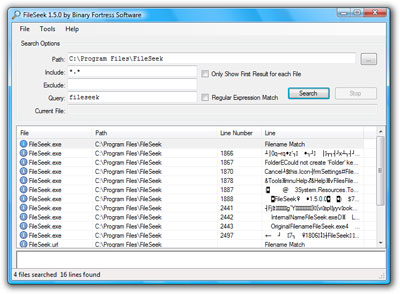
If you have auto-update notification enabled in FileSeek you will be prompted to download the new version, or you can just head over to the FileSeek page to download it.
I'm very happy to announce the release of FileSeek v1.5 today. This release includes some important fixes, and a couple of new features. Most notably, the exclusion pattern is now applied to folders as well as files. For the complete list of changes I invite you to check out the change log.
I encourage everyone who is running an older version to update today. If you have auto-update checking enabled in FileSeek you will be prompted to update next time you use it.
I'm happy to announce that FileSeek v1.3 was released this week. This new version adds sortable columns, the ability to copy selected results from the grid via the right-click menu and the number of characters displayed in the preview pane is now configurable in the options menu. Also, a number of bugs have been fixed as well, like the right-click "Open" command not working sometimes. This version of FileSeek and it's installer are also fully signed for full Vista compatibility.
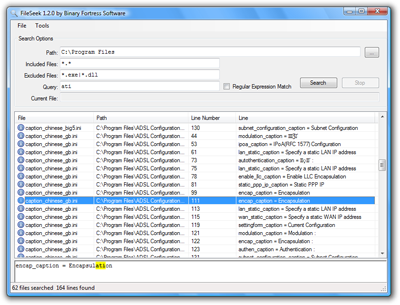
I urge everyone who is running an older version of FileSeek to download the new version today, and if you haven't tried FileSeek why not give it a try. You can either download an installer or an archive with only the .exe if you want to take it for a test drive before installing. Happy searching!