Home  •  FileSeek Online  •  Support
  •  
Binary Fortress Software DisplayFusion WallpaperFusion LogFusion ClipboardFusion Notepad Replacer
FileSeek: Lightning Fast File Search!
 

FileSeek Other Application Settings

FileSeek Other Application Settings

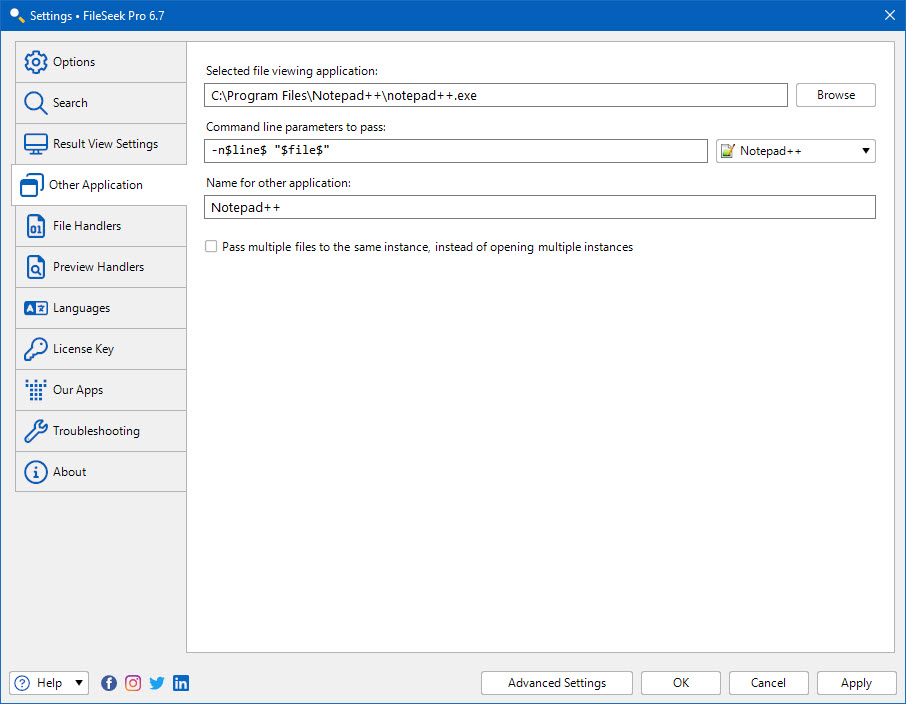
These settings are used by FileSeek to open a search result in a specific application. You can use the provided parameters to force the application to scroll to the specific line number as well.

You can configure these settings in the FileSeek Settings window on the "Other Application" tab.

These are settings for some common applications, if you would like to see an application listed here please Contact Us.

Application Command Line
LEd Latex Editor "$file$:$line$"
Notepad++ -n$line$ "$file$"
PSPad "$file$" -$line$
Texmaker "$file$" -line $line$
TextPad "$file$"($line$)
UltraEdit "$file$/$line$"
Download Now
Features
  • Search for text matches inside files
  • Search using Regular Expressions
  • Search folders and sub-folders
  • Match 1 or more file patterns
  • Exclude 1 or more file patterns
  • Filter results by date or size
  • Save Search Profiles
  • Sync Search Profiles with other computers
  • Never background indexes files
  • Download FileSeek today!
Social
Follow Binary Fortress Software on Twitter
Visit Binary Fortress Software on Google+
Other Great Products